

What is the problem with a normal mouse?
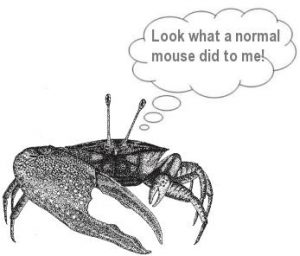 The danger for most people who use a mouse/touchpad is from the twisted arm posture that is maintained often for extended periods of time. This posture often involves reaching out to some extent which exhausts particular tendons in your arm from shoulder to fingertips and distorts your body’s core stability around the upper back and chest with some muscles underused and wasting and others overused and exhausted. We are becoming not unlike fiddler crabs in having unbalanced limbs and we tend to pay for this with tendonitis and other RSI conditions! Read more
A vertical mouse – is it difficult to use?
The characteristics of a truly ergonomic mouse are that your hand should grip it as though your hand was in a handshake posture. To do this the mouse buttons need to be on the side of the mouse rather than on the top and this is what you find with a vertical mouse. Most people find that it only takes a few minutes to get used to this new type of mouse and can often feel pain relief immediately (compared to a normal mouse).
Ergonomic Mouse & Keyboard Buying Guide
UK Suppliers 

Note for Evoluent mice size see sizing tab above
-

DXT Ergonomic Mouse
Excellent! Easy to use, hold like a pen. Ambidextrous – for left/right-handed.
View UK Supplier -
Ergonomic Penguin Mouse
A more familiar hold to gamers perhaps. Ambidextrous – for left/right-handed. See [Penguin Size] tab
View UK Supplier -
Evoluent Vertical Mouse
Comes in Left hand, Right Hand, Small, Large options [our tip is to pick DXT if you have small hands]
View UK Supplier -

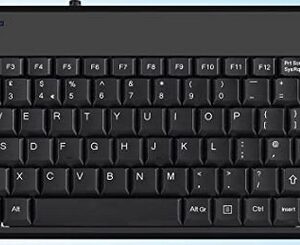
Perixx compact keyboard +2USB hubs
Inexpensive but effective compact wired keyboard with 2 USB Hubs
View UK supplier -
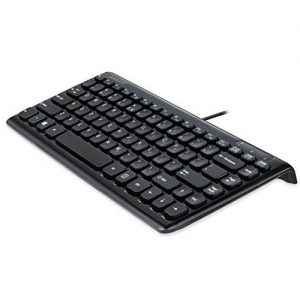
Perixx Mini Keyboard
Cheap and cheerful, slim compact wired keyboard. No USB sockets.
View UK supplier


This website operates ‘not for profit’ with our costs being supported through the small commissions (typically 1 – 3%) that we receive from suppliers
USA Suppliers

Note for Evoluent mice size see sizing tab above
-
DXT Ergonomic Mouse
Excellent! Easy to use, hold like a pen. Ambidextrous – works in either hand. Various models.
View USA Supplier -
Ergonomic Penguin Mouse
A more familiar hold to gamers perhaps. Ambidextrous – for left/right-handed. See [Penguin Size] tab
View USA Supplier -
Evoluent Vertical Mouse
Comes in Left hand, Right Hand, Small, Large options [our tip is to pick DXT if you have small hands]
View USA Supplier -
Perixx compact keyboard +2USB hubs
Inexpensive but effective compact wired keyboard with 2 USB Hubs
View USA supplier -
Perixx Mini Keyboard
Cheap and cheerful, slim compact wired keyboard. No USB sockets.
View USA supplier
This website operates ‘not for profit’ with our costs being supported through the small commissions (typically 1 – 3%) that we receive from suppliers
Canadian Suppliers

Note for Evoluent mice size see sizing tab above
-
DXT Ergonomic Mouse
Excellent! Easy to use, hold like a pen. Ambidextrous – for left/right-handed. Various models
View Canadian Supplier -
Ergonomic Penguin Mouse
A more familiar hold to gamers perhaps. Ambidextrous – for left/right-handed. See [Penguin Size] tab
View Canadian Supplier -
Evoluent Vertical Mouse
Comes in Left hand, Right Hand, Small, Large options [our tip is to pick DXT if you have small hands]
View Canadian Supplier -
Perixx compact keyboard +2USB hubs
Inexpensive but effective compact wired keyboard with 2 USB Hubs
View Canadian supplier -
Perixx Mini Keyboard
Cheap and cheerful, slim compact wired keyboard. No USB sockets.
View Canadian Supplier
This website operates ‘not for profit’ with our costs being supported through the small commissions (typically 1 – 3%) that we receive from suppliers
The Evoluent VerticalMouse 4 regular size models which are sometimes called 'large' (Right Wireless, Right Mac, Right Bluetooth, Right and Left) are for hands at least about 7 inches or 178 mm from the tip of the middle finger to the wrist crease. Hands shorter than 7 inches/178 mm may be more suitable for the VerticalMouse 4 Small.
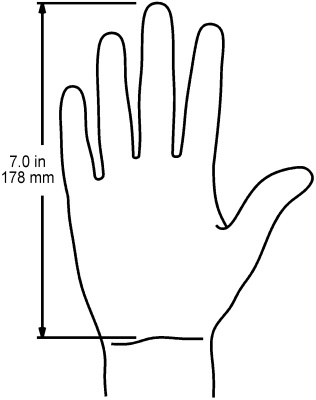
Measure your hand from the first crease on your wrist to the tip of your middle finger.
- SMALL 0-16 cm (0-6 ins approx)
- MEDIUM 16-18 cm (6-7 ins approx)
- LARGE 18 cm + (7 ins + approx)

Why use an Ergonomic Vertical Mouse?
 A conventional mouse twists the arm a quarter turn from its natural resting position and you will notice that you typically either twist your wrist back or hold the mouse in a hovering position when at the computer. If you use a laptop touchpad, notice how that also forces your arm into a different strained and twisted position. Muscles and tendons get damaged when they are held in a tense position for too long or over stretched. For most computer users with conventional mice, their mouse or laptop touchpad posture is often the primary RSI issue. To address this dangerous posture, your arms and shoulders should be relaxed with your upper arm vertical by your side and your forearm horizontal and resting. A picture tells a thousand words and the videos below explain the issues and how the DXT and Evoluent mice address these and their features well.
DXT Ergonomic Vertical Wireless Mouse
Click play to view video explaining the benefits of the DXT mouse
Evoluent Vertical Mouse Review with Inventor Jack Lo
Click play to view video explaining the benefits of the Evoluent mouse
How to use a Vertical Mouse
- Your arms and shoulders should be relaxed with your upper arm vertical by your side and your forearm horizontal.
- You should maintain a neutral hand and wrist position, similar to a handshake.
- You should be able to move your arm and shoulder freely.
- Hold the vertical ergonomic mouse lightly but touching the skin between your thumb and forefinger. Don’t grip it as you might have done with a conventional mouse. You gently push it towards the keyboard with the flat of your hand and pull backwards with your thumb.