
Ergonomic keyboards are surprisingly easy to find and an inexpensive fix!
Why Ergonomic Keyboards are not standard keyboards!
Take a quick look at your current keyboard. Does it have a number pad or extra function keys on the right side?
That’s more harmful than it seems.
These built-in keypads push your mouse further out to the side, forcing you to reach awkwardly every time you use it. Over time, this leads to muscle fatigue, tendon strain, and eventually pain in your arm or shoulder.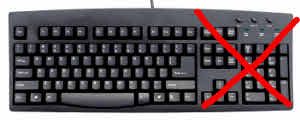
Our Tip:
Compact keyboards are inherently more ergonomic so choose a compact keyboard—one that doesn’t have extra key pads. Built-in number pads or extra function keys to the right are a real problem. If you really need a number pad, opt for a separate one that you can move out of the way when you’re not using it.
Also, look for a keyboard that’s slightly raised at the back, so your wrists stay in a more natural position as you type.
What about split keyboards?
In theory, split keyboards are designed to reduce the twisting of your hands while typing, allowing for a more natural hand position. While we’ve tried the original Microsoft model, it introduced some new problems for the wrists in our view. However, there are now many other brands available, and some may offer real benefits — we just haven’t found one yet.
Ergonomic Mouse & Keyboard Buying Guide
UK Suppliers 

Note for Evoluent mice size see sizing tab above
-

DXT Ergonomic Mouse
Excellent! Easy to use, hold like a pen. Ambidextrous – for left/right-handed.
View UK Supplier -
Ergonomic Penguin Mouse
A more familiar hold to gamers perhaps. Ambidextrous – for left/right-handed. See [Penguin Size] tab
View UK Supplier -
Evoluent Vertical Mouse
Comes in Left hand, Right Hand, Small, Large options [our tip is to pick DXT if you have small hands]
View UK Supplier -

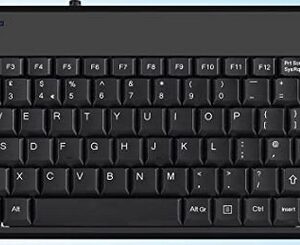
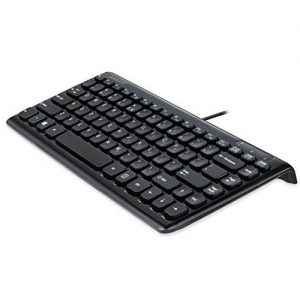
Perixx compact keyboard +2USB hubs
Inexpensive but effective compact wired keyboard with 2 USB Hubs
View UK supplier -
Perixx Mini Keyboard
Cheap and cheerful, slim compact wired keyboard. No USB sockets.
View UK supplier


This website operates ‘not for profit’ with our costs being supported through the small commissions (typically 1 – 3%) that we receive from suppliers
USA Suppliers

Note for Evoluent mice size see sizing tab above
-
DXT Ergonomic Mouse
Excellent! Easy to use, hold like a pen. Ambidextrous – works in either hand. Various models.
View USA Supplier -
Ergonomic Penguin Mouse
A more familiar hold to gamers perhaps. Ambidextrous – for left/right-handed. See [Penguin Size] tab
View USA Supplier -
Evoluent Vertical Mouse
Comes in Left hand, Right Hand, Small, Large options [our tip is to pick DXT if you have small hands]
View USA Supplier -
Perixx compact keyboard +2USB hubs
Inexpensive but effective compact wired keyboard with 2 USB Hubs
View USA supplier -
Perixx Mini Keyboard
Cheap and cheerful, slim compact wired keyboard. No USB sockets.
View USA supplier
This website operates ‘not for profit’ with our costs being supported through the small commissions (typically 1 – 3%) that we receive from suppliers
Canadian Suppliers

Note for Evoluent mice size see sizing tab above
-
DXT Ergonomic Mouse
Excellent! Easy to use, hold like a pen. Ambidextrous – for left/right-handed. Various models
View Canadian Supplier -
Ergonomic Penguin Mouse
A more familiar hold to gamers perhaps. Ambidextrous – for left/right-handed. See [Penguin Size] tab
View Canadian Supplier -
Evoluent Vertical Mouse
Comes in Left hand, Right Hand, Small, Large options [our tip is to pick DXT if you have small hands]
View Canadian Supplier -
Perixx compact keyboard +2USB hubs
Inexpensive but effective compact wired keyboard with 2 USB Hubs
View Canadian supplier -
Perixx Mini Keyboard
Cheap and cheerful, slim compact wired keyboard. No USB sockets.
View Canadian Supplier
This website operates ‘not for profit’ with our costs being supported through the small commissions (typically 1 – 3%) that we receive from suppliers
The Evoluent VerticalMouse 4 regular size models which are sometimes called 'large' (Right Wireless, Right Mac, Right Bluetooth, Right and Left) are for hands at least about 7 inches or 178 mm from the tip of the middle finger to the wrist crease. Hands shorter than 7 inches/178 mm may be more suitable for the VerticalMouse 4 Small.
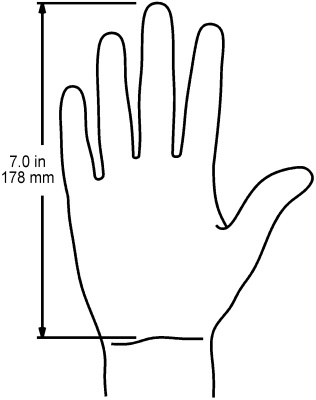
Measure your hand from the first crease on your wrist to the tip of your middle finger.
- SMALL 0-16 cm (0-6 ins approx)
- MEDIUM 16-18 cm (6-7 ins approx)
- LARGE 18 cm + (7 ins + approx)
