
What Helps (and What Doesn’t)
If you’re dealing with RSI (Repetitive Strain Injury) or general discomfort from long hours at the computer, arm and wrist supports can be a helpful part of your setup.
But before you start shopping, it’s worth understanding what works—and what might actually make things worse.
Mouse Wrist Rests: Not Always Helpful
If you’re using a true ergonomic vertical mouse, you probably don’t need a mouse wrist rest at all.
Why? Because a well-designed ergonomic mouse allows your forearm to rest naturally on the desk, with your hand gliding the mouse comfortably. Adding a wrist rest can interrupt this movement and create awkward tension—sometimes even making RSI symptoms worse.
✅ Tip: Focus on using a quality vertical ergonomic mouse that encourages a relaxed hand and wrist posture. Skip the mouse rest unless advised otherwise by a specialist.
Keyboard Wrist Rests: Worth Considering
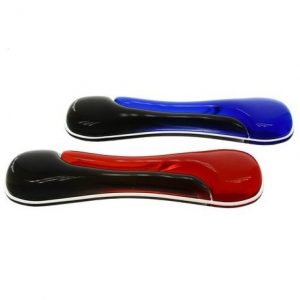
Keyboard wrist rests, on the other hand, can be more helpful—especially if your current keyboard setup causes your wrists to bend upward as you type.
These rests serve two purposes:
✅ They raise your wrists slightly, aligning them better with your keyboard.
✅ They provide soft cushioning, reducing pressure on the tendons.
However, you might find that switching to a low-profile compact keyboard achieves the same effect without the need for a wrist rest. Everyone’s body and setup are different, so it’s worth experimenting to find what feels best for you.
Good wrist rests are affordable and easy to try out—so if you’re experiencing discomfort, it’s a simple fix that might bring big relief.
Why Fingerless Gloves and Neck Warmers?
This one might surprise you, but staying warm while working can really help, especially during colder months BUT also in summer if you’re super cool with the air con.
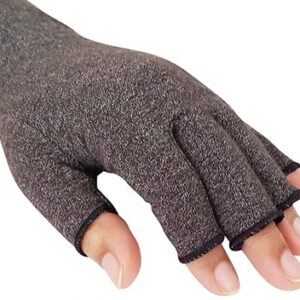
Fingerless gloves keep your wrists warm and supported without interfering with typing or mouse use.
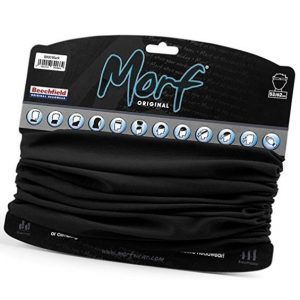
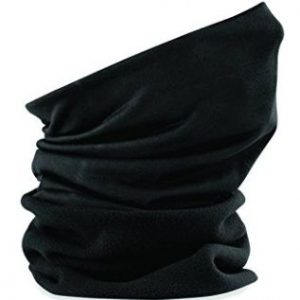
Neck warmers or thin scarves help reduce neck muscles tensing, especially if your workspace gets chilly!
When your muscles and tendons are warm, they move more freely and are less prone to strain—making your workday more comfortable and less painful.
Final Thoughts
Ergonomic wrist and arm accessories can play a key role in reducing RSI symptoms—but it’s important to choose the right ones for your setup and your body.
Quick Takeaways:
Skip mouse wrist rests if you’re using an ergonomic mouse.
✅ Try a keyboard wrist rest or a thinner keyboard if your wrists bend upward when typing.
Keep your neck and wrists warm with light, flexible clothing.
Sometimes small changes make a big difference.
Ergonomic Wrist Rests Buying Guide
UK Suppliers 

-

Fingerless Winter Gloves
Gloves for keeping your hands warm in the winter that don’t get in the way of typing
View UK supplier -
Keyboard Gel Wrist Rest from Kensington
Much improved design on more widely available rests.
View UK supplier -
Neck Warmer – microfibre
100% Polyester – Microfibre (Not Fleece!) Multi-Purpose Use. AntiMicrobial 100% Polyester – Microfibre Dimensions: 50Cm X 24Cm
View UK supplier
This website operates ‘not for profit’ with our costs being supported through the small commissions (typically 1 – 2%) that we receive from suppliers
USA Suppliers

-
Fingerless Winter Gloves
Gloves for keeping your hands warm in the winter that don’t get in the way of typing
View USA supplier -
Keyboard Gel Wrist Rest from Kensington
Much improved design on more widely available rests.
View USA supplier -
Neck Warmer – microfibre
100% Polyester – Microfibre (Not Fleece!) Multi-Purpose Use. AntiMicrobial 100% Polyester – Microfibre Dimensions: 50Cm X 24Cm
View USA supplier
This website operates ‘not for profit’ with our costs being supported through the small commissions (typically 1 – 2%) that we receive from suppliers
Canadian Suppliers

-
Fingerless Winter Gloves
Gloves for keeping your hands warm in the winter that don’t get in the way of typing
View Canadian supplier -
Keyboard Gel Wrist Rest from Kensington
Much improved design on more widely available rests.
View Canadian Supplier -
Neck Warmer – microfibre
Polyester Suprafleece for extra warmth. Breathable fabric. Machine washable/non iron. Seam free for comfort Dimensions: 50Cm X 24Cm
View Canadian supplier
This website operates ‘not for profit’ with our costs being supported through the small commissions (typically 1 – 2%) that we receive from suppliers